


Microsoft Places is brilliant right up to the moment someone says “can you set up 400 desks by Friday?”
The admin centre is fine for a handful of places. At scale it’s PowerShell, and the Places cmdlets have some lovely quirks. Workspaces are called Space in one place and Workspace in another. Desk modes live in a metadata dictionary. Set-PlacesSettings wants scope strings with group object IDs in them. After the third site I’d stopped remembering syntax and started keeping a folder of scripts I was slightly afraid of.
So I turned the folder into an app. It’s called Places Toolbox, it’s free, and it’s on GitHub: robwatts365/PlacesPowerShell-Toolbox.
What it is
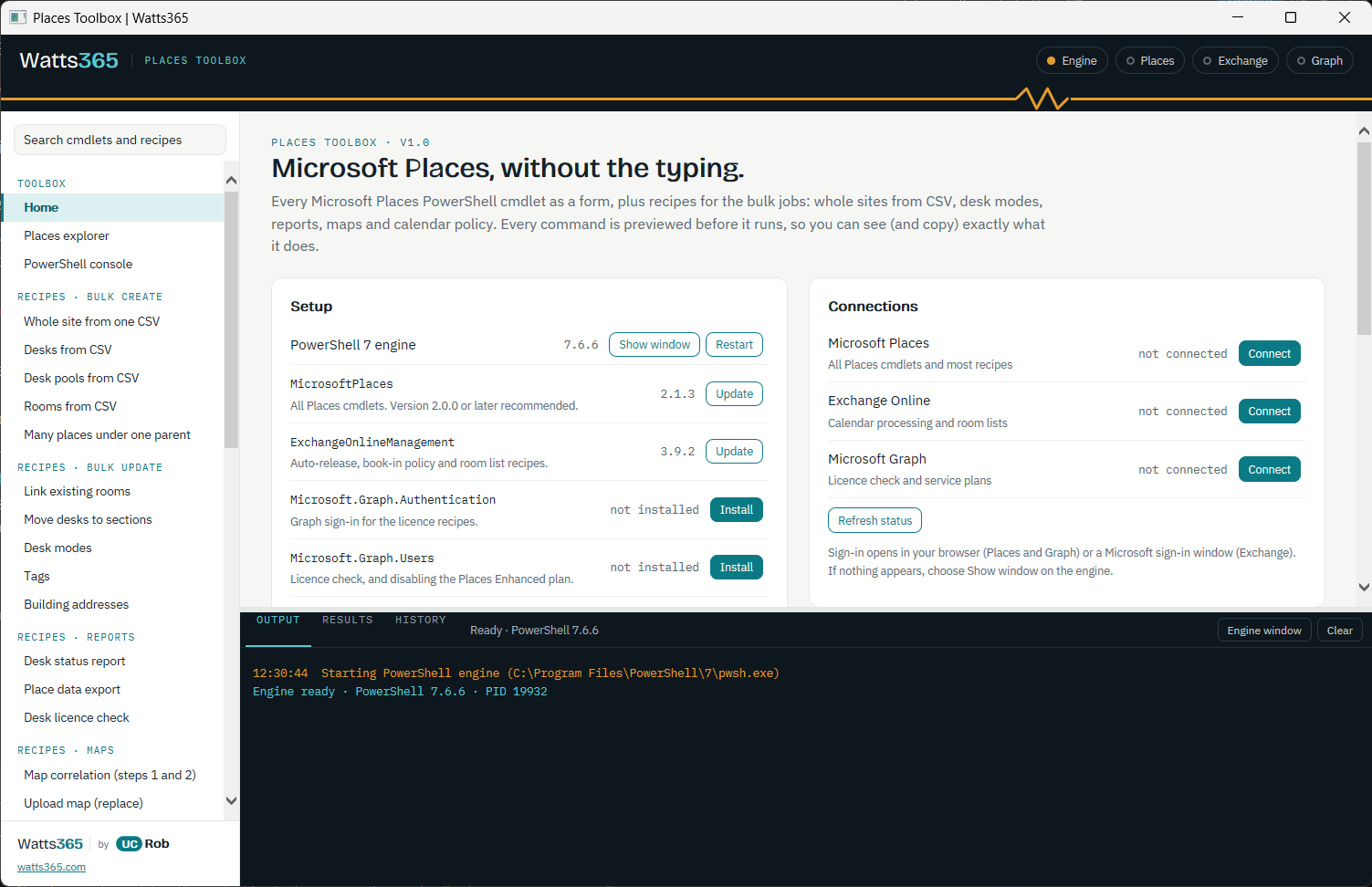
Places Toolbox is a Windows app (an HTA, if you remember those) that sits on top of the Microsoft Places PowerShell module. You pick a cmdlet, fill in a form, check the command preview and choose Run. Everything runs in one signed-in PowerShell 7 session, so you connect once and variables stick around between runs. $Last always holds the previous results.
All 19 documented Places cmdlets have a form, from Connect-MicrosoftPlaces through Get-PlaceV3, New-Place, Push-Dataset, New-Map and the device and sensor cmdlets. The form generator deals with the parameter quirks for you, and the place picker is backed by your live hierarchy, so you’re choosing buildings and floors rather than pasting names and hoping.
The destructive ones (Remove-Place, Remove-Map, Set-PlacesSettings, Set-PlaceDevice and Remove-PlaceDevice) show you the exact command and ask before they do anything.
The recipes are the point
The forms save typing. The recipes save afternoons. These are my field scripts, turned into repeatable jobs that run from a CSV, and every CSV recipe has a dry run. A dry run checks each row against your live buildings, floors and sections and tells you what would happen, without changing a thing. Run it, fix the typos in the CSV, run it again, and only then do it for real.
A few of the ones I reach for most:
- Whole site from one CSV: buildings, floors, sections, rooms, workspaces and desks, created parents first.
- Desks from CSV: a mode per row, so Reservable, Drop-in, Assigned (with a user), New or Maintenance can all live in one file.
- Desk modes, tags and building addresses: bulk changes without a hundred copy and pastes.
- Desk status report: every desk with its location and mode, as a CSV and a filterable HTML page.
- Desk licence check: shared-space licence compliance for Reservable and Drop-in desks, using Graph.
- Auto-release and restrict booking to a group: the Exchange calendar policy side, set properly.
- Upload map:
New-Map, optionally removing the existing map first.
Each recipe has an Open CSV template button that drops a starter file into your output folder, so you’re never staring at a blank spreadsheet wondering what the column is called.
Getting going
You need Windows 10 or 11, PowerShell 7.4 or later and the MicrosoftPlaces module (2.0.0 or later is best). The Home page installs or updates the module for you, plus the optional Exchange and Graph modules if you want the calendar and licence recipes.
- Download or clone the repo. If you grabbed a zip, unblock it before extracting: right-click, Properties, Unblock.
- Double-click
PlacesToolbox.hta. - On Home, install anything missing, then choose Connect next to Microsoft Places.
- Pick a cmdlet or recipe, fill it in and run it. For recipes, Dry run first. Always.
Roles-wise you need Places Administrator, Exchange Administrator or a custom role with TenantPlacesManagement. Roles assigned through an Entra group aren’t honoured by Places, so assign them directly. Yes, I found that out the long way.
Good to know
- Security baselines: the app needs
mshta.exe, which some baselines and attack surface reduction rules block. If it won’t open, check that first. - Nothing phones home: the only traffic is to Microsoft’s own sign-in and service endpoints. Fonts load from Google Fonts, and if those are blocked the app falls back to Segoe UI.
- Slow to show:
Set-PlaceV3changes to rooms and workspaces can take up to 24 hours to appear, and maps up to an hour. That’s Places, not the toolbox, so don’t panic and re-run it. - Cancel: stops a recipe at the next row. A single cmdlet can’t be interrupted mid-call, so if one is stuck, use Restart engine on Home.
- Everything is logged: a timestamped log of every command goes in the output folder, which is handy when someone asks “what did you change?”.
The recipe functions also work without the UI. Dot-source engine\PlacesToolbox.Recipes.ps1 after defining a few stub logging functions and you can call them from your own scripts.
Over to you
It’s version 1, and I’m sure there are cmdlets and edge cases I haven’t hit yet. If something breaks, or you’ve got a recipe you wish it had, open an issue on GitHub and tell me. It’s MIT licensed, so fork it, bend it and make it yours.
If it saves you an afternoon, you know where the beer button is. It’s on the About page.
Places Toolbox is an independent community tool. It isn’t made, endorsed or supported by Microsoft. Views are my own.